
Select a Property
Load a WAREE listing and its existing gallery.
Create polished property videos and social-ready formats directly from the listing gallery already inside WAREE. No separate editing workflow. No rebuilding the property from scratch.
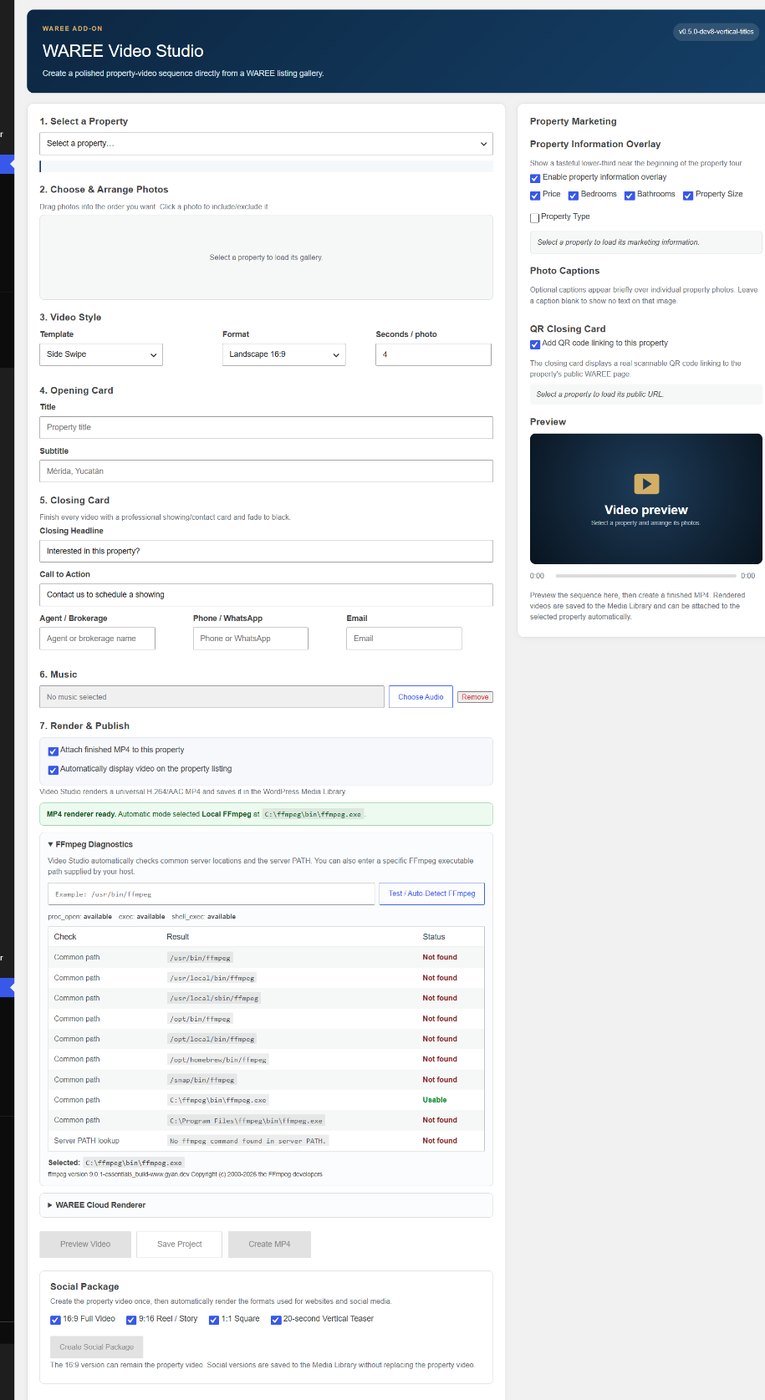
Video Studio starts with the WAREE property and its photo gallery. Select the listing, arrange the photos, choose the presentation style, add the property details you want shown, and render the finished video.
Use the existing listing gallery.
No duplicate image upload workflow.
Pull property marketing details into the video.
Price, bedrooms, bathrooms, size and other selected information can travel with the listing.
Keep the call to action connected.
Closing cards can direct viewers back to the property with a QR code.
Video Studio is designed for real estate work, so the controls follow the way a listing is already organized.
Load a WAREE listing and its existing gallery.
Choose which images appear and place them in presentation order.
Select a presentation template and timing that fits the property.
Use an opening card, captions, property information, music and closing CTA.
Review the sequence and save the project so you can return to it later.
Create the MP4, attach it to the property and generate social-ready variations.
WAREE Video Studio includes multiple presentation styles so every property does not look exactly the same. Use restrained movement for elegant listings or more dynamic transitions when the marketing calls for it.
The walkthrough-style zoom uses directional push and pull motion to create a stronger sense of moving through the property rather than simply enlarging a still image.
Create property video, social formats and connected calls to action without leaving your real estate platform.