
How to Create Real Estate Listing Videos Without a Video Editor
Creating professional property videos used to require video editing software, specialized skills, or an outside production company.
For luxury listings and cinematic property tours, professional videography still has an important place.
But what about every other listing?
Most real estate agents already have the ingredients needed to create an effective property video: quality photographs, property information, branding, and contact details.
The challenge is turning those assets into video without spending hours learning editing software.
That’s where real estate listing video automation is changing the process.
Why Real Estate Listing Videos Matter
Property marketing is increasingly visual.
Buyers want to see more than a paragraph describing a home. Photographs remain essential, but video provides another way to present those photographs as a guided experience.
A listing video can be used on:
- Property websites
- Social media
- Email campaigns
- Agent websites
- Landing pages
- Digital presentations
More importantly, one property video can become the foundation for several pieces of marketing content.
Instead of creating something once and using it in one place, agents can repurpose the same property assets across multiple channels.
The Traditional Way to Create a Property Video
A conventional listing video workflow often begins outside the real estate platform.
First, the agent downloads property photographs.
Next, those images are imported into video editing software.
Then someone needs to arrange them in the correct sequence, create transitions, add property information, select music, insert branding, prepare an opening title, and create a closing screen.
After rendering the video, the finished file needs to be uploaded somewhere.
Social media may require additional versions with different dimensions.
None of those steps is particularly unreasonable.
Together, however, they turn a simple property video into another production project.
What Does a Real Estate Listing Video Actually Need?
Not every listing requires drone footage and cinematic camera work.
For many properties, a professional presentation can be created from information the agent already has.
The essential ingredients are relatively simple:
Property photographs + property information + motion + branding + contact information
A polished video can then add elements such as:
- Opening title
- Property location
- Price
- Bedrooms and bathrooms
- Property size
- Photo captions
- Smooth transitions
- Music
- Agent or brokerage information
- Closing message
- QR code
The important question is where that information comes from.
If the property already exists inside the real estate system, the agent shouldn’t have to enter everything again.
Start With the Property Gallery
Good listing videos begin with good photographs.
The property gallery therefore becomes the natural starting point.
Agents should first review the images and determine which ones best tell the property’s story.
A logical sequence might begin with the exterior, move into primary living areas, continue through bedrooms and bathrooms, and finish with outdoor or lifestyle features.
The exact sequence will vary by property.
What’s important is that the photographs feel intentional rather than random.
A gallery manager that allows photographs to be reordered makes this process considerably easier.
Once the gallery is organized, those same images can feed directly into the video workflow.
Add Motion Without Making the Video Distracting
Still photographs don’t have to feel completely still.
Subtle movement can create the impression of traveling through a property.
For example, an image can slowly push forward, pull back, or move gently from one side to another.
Transitions can connect one room to the next.
However, more motion isn’t necessarily better.
Constant zooming, spinning, or dramatic effects can make a property video feel like a slideshow from twenty years ago.
The objective is to make the photography feel alive while keeping attention on the home.
For real estate, subtle motion usually wins.
Property Information Should Be Easy to Read
Video gives agents another opportunity to communicate essential property information.
That doesn’t mean every available field belongs on the screen.
A viewer may benefit from seeing:
$449,000 | 3 Bedrooms | 3 Bathrooms | 295 m²
Those details can provide immediate context without overwhelming the photography.
Additional information can appear selectively where appropriate.
The video should complement the property listing, not attempt to reproduce the entire listing page inside a moving frame.
Photo Captions Can Add Context
Some photographs benefit from additional explanation.
A beautiful room might simply need to speak for itself.
Other images may show something viewers won’t immediately understand.
A caption could identify:
Recently Renovated Kitchen
Private Courtyard
Original Colonial Architecture
Solar Panels
Primary Suite
Captions are particularly useful when a photograph contains a feature that contributes significantly to the property’s value.
Again, restraint matters.
If every image contains several lines of text, viewers stop looking at the property.
Music Changes the Presentation
Music has a surprisingly large effect on how a property video feels.
A modern condominium may benefit from something contemporary.
A colonial home may call for a warmer or more elegant presentation.
Luxury properties might use cinematic music.
Beach properties can support something lighter.
The music shouldn’t overpower the listing.
Instead, it establishes the pace and atmosphere of the presentation.
Agents should also make sure they have the appropriate rights to use any music included in commercial property marketing.
Don’t Forget the Closing Card
A property video shouldn’t simply stop after the final photograph.
The closing screen has a job.
It tells the viewer what to do next.
That could include:
Interested in this property?
Contact us to schedule a showing.
Then provide appropriate contact information.
A QR code can make the closing card even more useful by giving viewers a direct path back to the property listing.
Someone watching the video on another device can scan the code and immediately access additional photographs, property details, maps, or an inquiry form.
That connects video marketing directly back to lead generation.
One Video Isn’t Enough Anymore
Here’s another challenge.
A traditional landscape video may work perfectly on a website or video platform.
Social media often wants something different.
Vertical formats are increasingly important for mobile-first platforms.
Square content may work better in other placements.
Short teaser videos can serve another purpose entirely.
That means one property might need several versions:
16:9 Landscape
9:16 Vertical
1:1 Square
Short Vertical Teaser
Creating each version manually increases the workload considerably.
Automated video workflows can solve this by creating multiple formats from the same property project.
The agent builds the presentation once.
Technology handles the variations.
From Listing Video to Social Media
This is where property video becomes part of a larger marketing workflow.
Imagine the sequence:
Property → Gallery → Video → Social Formats → Social Publishing → Property Page
The agent isn’t creating five unrelated pieces of content.
They’re using one authoritative property record to create multiple marketing assets.
That’s a much more scalable approach.
It also reduces the chance that one marketing channel contains outdated information while another has the correct details.
Where AI Fits Into Property Video
Artificial intelligence can assist with parts of the video workflow without actually becoming the video editor.
For example, AI can help prepare:
- Photo captions
- Opening titles
- Property summaries
- Closing messages
- Social media copy
- Video descriptions
The important advantage comes from context.
If AI already has access to approved property information, the agent doesn’t need to explain the listing from scratch.
As we’ve discussed in our guide to AI agents for real estate, useful AI becomes much more powerful when it operates within a defined workflow.
Video is another example of that principle.
Automation Doesn’t Replace Professional Videography
Automated property videos and professional real estate videography solve different problems.
A multimillion-dollar luxury property may justify drone photography, professional lighting, cinematic cameras, narration, and sophisticated editing.
Nothing about automation changes that.
The problem is that most listings don’t receive that level of production.
For those properties, the choice isn’t necessarily between an automated video and a professional film crew.
Often, the real choice is:
Automated video or no video at all.
That’s where listing video automation becomes valuable.
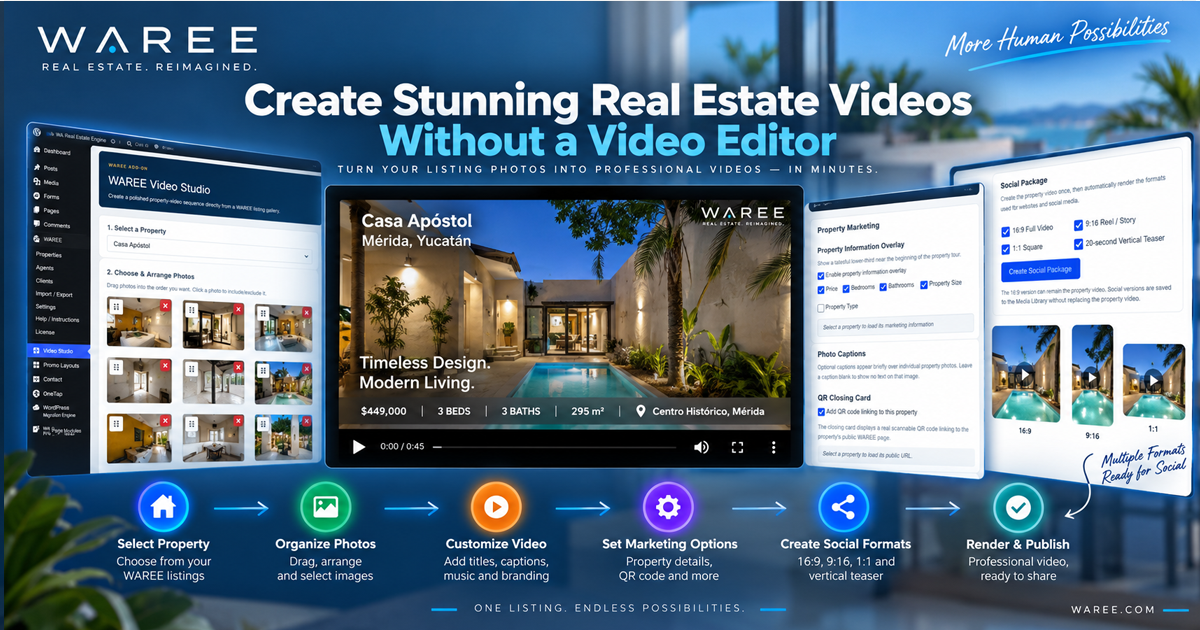
How WAREE Video Studio Approaches the Problem
WAREE Video Studio begins with something that already exists:
the property.
Instead of building a video project from scratch, the agent can select a WAREE property and work directly with its listing gallery.
Photos can be selected and arranged.
Video styles can control how those images move.
Property information can appear as an overlay.
Individual photographs can receive captions.
Music can be added.
Opening and closing cards can provide context and contact information.
A QR code can link viewers directly back to the property.
Once the project is ready, WAREE can render the finished property video and attach it back to the listing.
The same project can also create social-media formats without requiring the agent to rebuild the video.
That changes the workflow from:
Download → Upload → Re-enter → Edit → Export → Re-upload
to:
Property → Video → Publish
Video Should Be Part of the Listing Workflow
This is the larger point.
Real estate video shouldn’t have to exist as an isolated activity.
The photographs already exist.
The property information already exists.
The agent information already exists.
The website already exists.
Why rebuild all of that somewhere else just to make a video?
Connected real estate software can use those existing assets to make video another step in the property marketing workflow.
That’s the same philosophy behind real estate listing automation more broadly.
Enter accurate information once.
Review it.
Then allow that information to support everything that comes afterward.
More Marketing Without More Work
Real estate professionals don’t need another complicated application demanding their attention.
They need ways to get more value from work they’ve already completed.
A property gallery shouldn’t only create a gallery.
It can create a video.
That video can create social content.
Social content can bring visitors back to the property.
Those visitors can become leads.
And those leads can enter the CRM for qualification, property matching, and follow-up.
That’s when video stops being another marketing task.
It becomes part of the real estate workflow.