
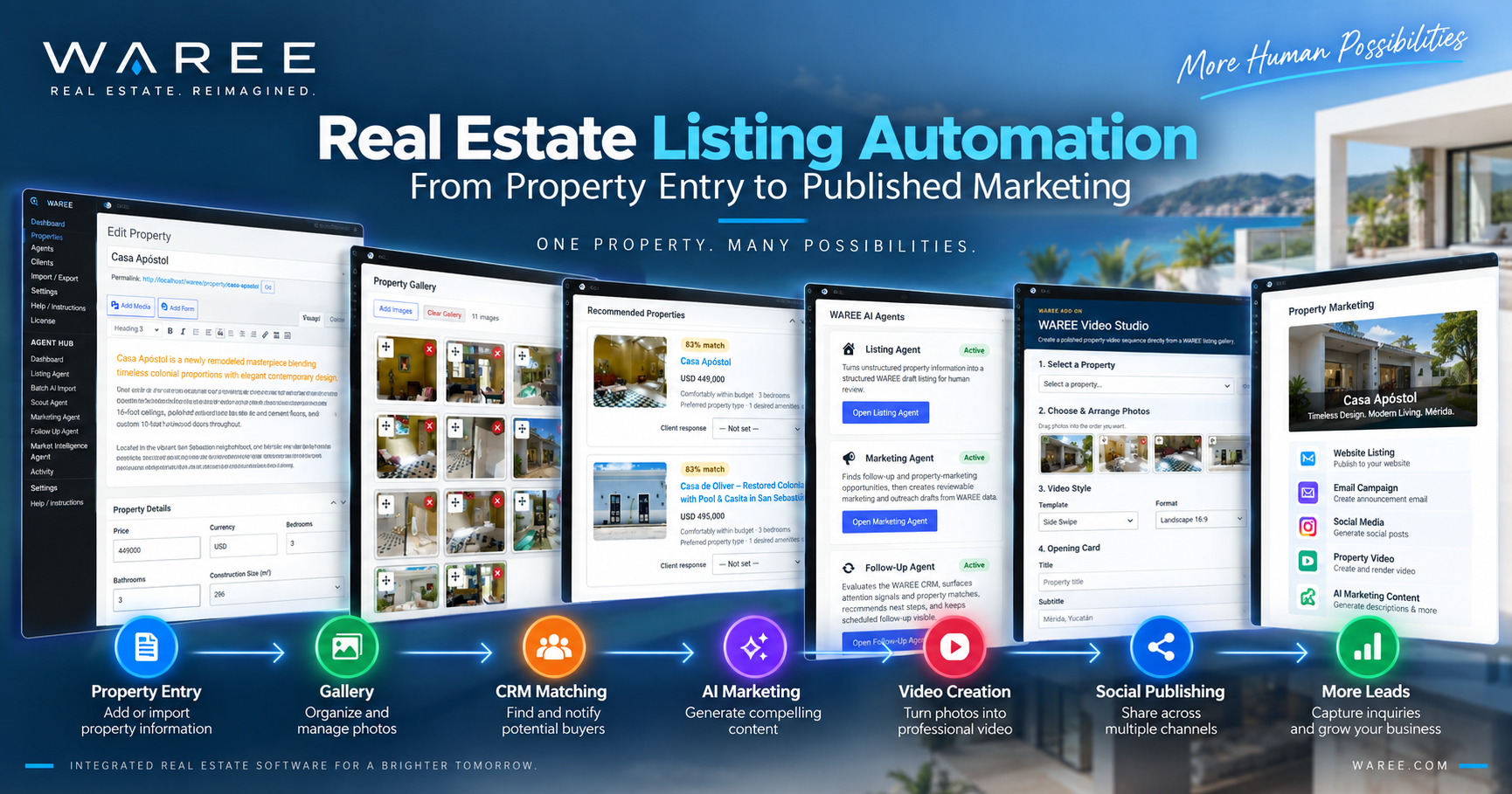
Real Estate Listing Automation: From Property Entry to Published Marketing
Creating a real estate listing sounds simple. Add the property information, upload some photographs, write a description, and publish it.
Unfortunately, that’s usually just the beginning.
The same property may then need to appear on a website, in marketing emails, on social media, inside a CRM, in a property video, and across other marketing channels. Every additional step creates more work.
That’s where real estate listing automation can make a significant difference.
Instead of treating each marketing activity as a separate project, agents can build a workflow where property information is entered once and then used throughout the rest of the business.
What Is Real Estate Listing Automation?
Real estate listing automation uses technology to reduce the repetitive work involved in creating, managing, updating, and marketing properties.
The idea is simple:
Enter information once. Use it many times.
Consider a new listing containing:
- Price
- Address
- Property type
- Bedrooms
- Bathrooms
- Lot size
- Construction size
- Amenities
- Description
- Photographs
- Agent information
All of this information has value beyond the property detail page.
Marketing needs it.
Video needs it.
Social media needs it.
Buyer matching needs it.
Email campaigns may need it.
Artificial intelligence can also use it.
When every application requires the agent to enter that information again, the workflow becomes unnecessarily inefficient.
Step 1: Collecting Property Information
Listing automation begins with good data.
Unfortunately, property information can arrive in almost any format.
An owner might send details through email or WhatsApp. Another brokerage may provide a webpage. Information could arrive through a spreadsheet, CSV file, XML feed, API, MLS, or another property database.
Sometimes the only source is a poorly formatted listing containing information scattered across several sections.
Modern property software can help organize these different sources into structured fields.
For example, an import process may identify a price, address, bedrooms, bathrooms, amenities, description, images, and other property characteristics.
Automation can dramatically reduce data entry, but one principle remains essential:
Imported information should be verified before publication.
Faster isn’t better if the listing is wrong.
Step 2: Creating a Single Property Record
Once the information has been collected, the property should have one authoritative record.
Think of this as the property’s single source of truth.
If the listing says the property costs $425,000, downstream marketing should use that price.
When the price changes to $399,000, the authoritative property record should change first.
The same principle applies to property status.
A property marked as sold shouldn’t continue appearing as available simply because an old copy of the listing exists somewhere else.
Centralized property data helps prevent those inconsistencies.
Step 3: Organizing the Property Gallery
Photography is one of the most important parts of a property listing.
However, simply uploading 40 photographs isn’t enough.
Their order matters.
The strongest image generally becomes the featured image. After that, photographs should help tell the story of the property.
An effective property management system should allow agents to:
- Review uploaded photographs
- Select the featured image
- Rearrange gallery order
- Add additional photographs
- Remove unwanted images
- Maintain the property’s media library
That gallery can then become an asset for more than the website.
The same approved photographs can support video, social media, print materials, and other marketing.
Step 4: Writing the Property Description
Property descriptions are an obvious opportunity for AI assistance.
Structured property information can give artificial intelligence useful context for preparing a first draft.
For example, AI might work from known facts such as:
Three bedrooms + two bathrooms + pool + renovated kitchen + Centro location
and turn those details into readable marketing copy.
However, there’s an important boundary.
AI should help present facts, not create them.
If the property data doesn’t mention ocean views, the description shouldn’t suddenly advertise them.
Human review remains important because the agent ultimately knows whether the description accurately represents the property.
Step 5: Publishing the Listing
Once approved, the listing can be published to the real estate website.
A well-structured property page may contain much more than photographs and a description.
Depending on the market, useful information can include:
- Property specifications
- Amenities
- Maps
- Nearby locations
- Neighborhood information
- Currency conversion
- Metric and imperial measurements
- Agent contact information
- Video
- Buyer inquiry forms
- Property qualification tools
International real estate adds another layer of complexity.
A buyer in Canada, Mexico, France, or the United States may think about currency, measurements, addresses, and terminology differently.
Listing technology should make the property understandable without changing the property’s authoritative data.
Step 6: Matching the Property With Buyers
Publishing shouldn’t necessarily be the end of the listing workflow.
It can be the beginning of another one.
Suppose the CRM contains a buyer looking for:
- Three bedrooms
- Swimming pool
- A particular neighborhood
- Maximum budget of $450,000
A newly published $425,000 property matching those requirements represents a potential opportunity.
Property-matching technology can help identify that connection automatically.
Instead of relying on the agent to remember every buyer’s requirements, software can surface potential matches for review.
This is where property management and CRM become much more valuable when they work together.
Step 7: Creating Marketing Content
Now the property needs promotion.
Traditionally, this means copying the listing information into another application.
Then another.
And probably another.
Connected listing automation can eliminate much of that repetition.
Because the approved property information already exists, a marketing system can use it as context for creating:
- Email copy
- Social media posts
- Property announcements
- Advertising ideas
- Buyer-specific messages
- Website content
Artificial intelligence becomes particularly useful here.
Instead of asking generic AI to create an advertisement and then explaining the property from scratch, a connected Marketing Agent can work from the actual property record.
That saves time while reducing the chance of inconsistent information.
Step 8: Creating a Property Video
Video used to require a completely separate production workflow.
Photographs had to be downloaded.
Property information needed to be copied.
Everything then moved into editing software where transitions, titles, music, captions, and branding were created.
Listing automation can simplify that process.
A property system already has many of the required assets:
Photos + Property Data + Agent Information + Branding
Those assets can be used to create an automated listing video containing elements such as motion effects, property information, photo captions, music, opening and closing cards, and QR codes.
Professional cinematography still has an important place, particularly for high-end properties.
Automated video solves a different problem.
It allows far more everyday listings to receive video marketing without requiring a complete video-production project.
Step 9: Preparing Social Media Content
The same principle applies to social media.
Once a listing exists, an agent shouldn’t have to rebuild it to create a Facebook or other social post.
Approved property information can provide the foundation for platform-appropriate content.
AI can help adapt the message while maintaining the important property facts.
Human review should still be part of the process.
Automating content preparation is useful.
Automatically publishing inaccurate or inappropriate information isn’t.
The ideal workflow combines speed with control.
Step 10: Capturing the Response
Marketing only matters if interested people have somewhere to go.
A person who discovers the property through a video or social post might visit the listing and submit an inquiry.
At that point, another workflow begins:
Property → Visitor → Inquiry → CRM → Qualification → Follow-Up
Because the inquiry originated from a specific property, the system already has useful context.
The CRM shouldn’t merely know that someone named Maria submitted a form.
It should also be able to know which property interested Maria.
That information can improve qualification, property matching, and follow-up.
What Happens When the Property Changes?
Automation is equally important after publication.
Real estate isn’t static.
Prices change.
Photographs get updated.
Properties move from available to pending or sold.
Descriptions change.
New information becomes available.
When multiple disconnected systems contain independent copies of the property, every change creates another synchronization problem.
A connected system reduces that risk by keeping the authoritative property record at the center of the workflow.
Where AI Agents Fit Into Listing Automation
AI agents can support different stages of this process.
A Listing Agent can help structure incoming property information.
A Marketing Agent can use approved listing data to prepare promotional content.
A Follow-Up Agent can help identify opportunities after buyers engage with properties.
Meanwhile, the CRM and matching system can connect property information with buyer requirements.
Rather than asking one AI tool to do everything, specialized agents can support specific parts of the workflow.
The human real estate professional remains responsible for review and judgment.
How WAREE Approaches Listing Automation
WAREE was designed around the idea that a property shouldn’t need to be recreated every time it moves to another part of the real estate workflow.
Property information can become the foundation for multiple activities.
The listing can connect with CRM records and buyer matching.
Approved property information can support marketing.
Photos can become part of a listing video.
Marketing content can support social publishing.
Inquiries can return to the CRM with property context.
WAREE’s AI Agent Hub can assist at different stages without requiring the agent to continually explain the property again.
The objective is a connected workflow:
Import → Review → Property → Publish → Match → Market → Video → Social → Lead → CRM → Follow-Up
Not every step needs to happen automatically.
More importantly, every step shouldn’t need to start over.
Automation Should Remove Repetition, Not Control
There’s an important distinction between good automation and excessive automation.
The goal isn’t to let software make every decision.
Real estate professionals still need to verify property information, select photographs, approve marketing, communicate with clients, make recommendations, and exercise professional judgment.
Technology is most valuable when it handles the repetitive work surrounding those decisions.
An agent shouldn’t spend valuable time copying a property’s bedroom count from one application into another.
They should spend that time deciding how best to market the property and serve the client.
One Property. One Workflow. Many Possibilities.
The biggest opportunity in real estate listing automation isn’t generating property descriptions faster.
It’s connecting everything that happens after the property enters the system.
A listing can become marketing.
Marketing can generate leads.
Leads can become CRM contacts.
CRM preferences can create property matches.
Property matches can create follow-up opportunities.
Each step becomes more useful because it connects to the next.
That’s what good automation should accomplish.
Not more software.
Not more complexity.
Less repetition—and more time for real estate.